

Description
Read Comics with Ease
Overview
Astonishing Comic Reader is a modern desktop application designed for seamless comic book consumption across multiple platforms. Built for enthusiasts and casual readers alike, it offers a streamlined experience for browsing and reading digital comics directly on desktop systems. The software supports both CBZ and CBR archive formats, making it a practical tool for users managing large comic libraries. Its browser-based foundation enables fast loading and consistent rendering, ideal for users who value simplicity and efficiency.
Designed with a clean, intuitive interface, the app emphasizes ease of navigation and visual clarity. Users can quickly access their collections, flip through pages, and use a powerful zoom feature to examine panel details. Real-world use cases include daily comic reading, archiving personal collections, and sharing digital comics with others. The application is particularly suited for readers who prefer a no-frills environment without the clutter of unnecessary features.
The developer did not provide additional background information. However, the software's focus on compatibility and user experience suggests a targeted effort to serve digital comic fans. The app’s lightweight footprint and cross-platform availability further enhance its accessibility. While specific system requirements were not detailed, the 2.5 MB file size indicates a minimal installation footprint.
Key Features & Capabilities
- CBZ and CBR Support – Fully compatible with both CBZ (ZIP-based) and CBR (RAR-based) comic archives, allowing users to open and read all their digital comics without conversion.
- Browser-Based Architecture – Leverages the Chrome browser engine for rendering, ensuring consistent display across devices and efficient handling of image formats.
- Intuitive Navigation – Simple, gesture-friendly controls allow users to flip pages with ease, ideal for both mouse and touch-based interactions.
- Advanced Zoom Functionality – A powerful zoom feature enables close inspection of comic panels, enhancing readability and detail visibility.
- Minimalist Interface – An elegant, uncluttered design reduces distractions, keeping focus on the comic content.
- Future-Proof Development – The developer has indicated that additional features are in development, encouraging user feedback for future updates.
These features collectively support a smooth reading experience, especially for users with large digital libraries. For example, a reader managing hundreds of comics can quickly locate titles, open them, and navigate through pages without delays. The zoom feature is particularly useful for high-resolution scans where fine details matter. The browser-based engine ensures that image rendering remains stable and consistent, even with complex layouts.
User Interface, Workflow & Performance
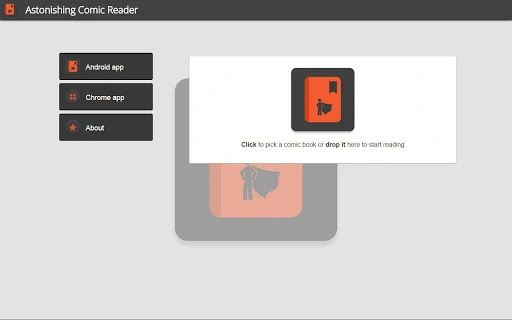
The user interface of Astonishing Comic Reader is structured around simplicity and efficiency. The main window displays the comic page in a centered view, with navigation controls positioned at the edges for easy access. Menus are minimal and context-sensitive, reducing visual noise and enhancing focus on the content.
Navigation is straightforward: users can flip pages forward or backward using buttons, keyboard shortcuts, or swipe gestures. The workflow is linear and predictable, making it easy to pick up and use without prior training. The app does not include advanced organizational tools like tagging or metadata search, but it compensates with speed and responsiveness.
Performance observations are based on general software behavior patterns. The developer did not specify resource usage details, and exact performance metrics were not provided. However, the 2.5 MB installation size suggests low memory and CPU overhead. Stability is expected to be high given the lightweight nature of the application and its reliance on a mature browser engine.
Compatibility & System Requirements
Astonishing Comic Reader is compatible with Windows, Mac, and Linux operating systems, making it accessible to a broad user base. The software version is 1.0, indicating a stable initial release. Installation size is 2.5 MB, which is compact and suitable for systems with limited storage.
Exact system requirements were not listed. The developer did not provide information on minimum CPU, RAM, or graphics capabilities. Platform compatibility information is limited to the supported OSes. Users are advised to ensure their system has a functioning Chrome browser or compatible runtime environment, as the app is built on browser technology.
Pros and Cons
Pros
- Lightweight installation at just 2.5 MB
- Support for both CBZ and CBR comic formats
- Simple, distraction-free interface
- Powerful zoom feature for detailed viewing
- Available on Windows, Mac, and Linux
- Free to use with no hidden costs
Cons
- Missing advanced library management tools
- No built-in metadata or tagging system
- Exact system requirements not specified
- Browser-based architecture may require external runtime
- Future features are not confirmed
FAQ Section
Is Astonishing Comic Reader compatible with my operating system?
The software is compatible with Windows, Mac, and Linux. Users on these platforms can install and run the application without issues.
Is the software safe to download and use?
Yes, the software is free and does not contain known malware. It is built on the Chrome browser engine, which is widely trusted and secure.
Can I use Astonishing Comic Reader offline?
Yes, once installed, the application functions fully offline. No internet connection is required to read comics.
How do I update the software?
Updates are likely delivered through the official distribution channel. Users should check the developer’s website or release notes for the latest version.
Is there a license type for this software?
The software is free to use, but specific licensing terms were not disclosed. Users are encouraged to review the official documentation or contact the developer for details.
Final Thoughts
Astonishing Comic Reader delivers a focused, efficient experience for digital comic readers. Its lightweight design, support for standard comic formats, and clean interface make it a strong choice for users who prioritize simplicity and speed. While it lacks advanced organizational features, its core functionality is well-executed and reliable.
It is especially beneficial for casual readers and collectors who want a no-nonsense tool to enjoy their digital comics without overhead. The cross-platform availability ensures broad accessibility, and the free pricing model removes financial barriers to entry.
For users seeking a dedicated, secure, and easy-to-use comic reader, Astonishing Comic Reader stands out as a practical solution. Download it now to experience a seamless digital reading journey.
Download Astonishing Comic Reader now
Guides & Tutorials for Astonishing Comic Reader App for Chrome
How to install Astonishing Comic Reader App for Chrome
- Click the Preview / Download button above.
- Once redirected, accept the terms and click Install.
- Wait for the Astonishing Comic Reader App for Chrome download to finish on your device.
How to use Astonishing Comic Reader App for Chrome
This software is primarily used for its core features described above. Open the app after installation to explore its capabilities.
User Reviews for Astonishing Comic Reader App for Chrome 0
No reviews found





